
Webinar on the security of every layer of OBIEE 11g: the application, the WebLogic application server and the repository database, plus its integration with Oracle E-Business Suite.
 Play the Recording: OBIEE Security Examined Webinar
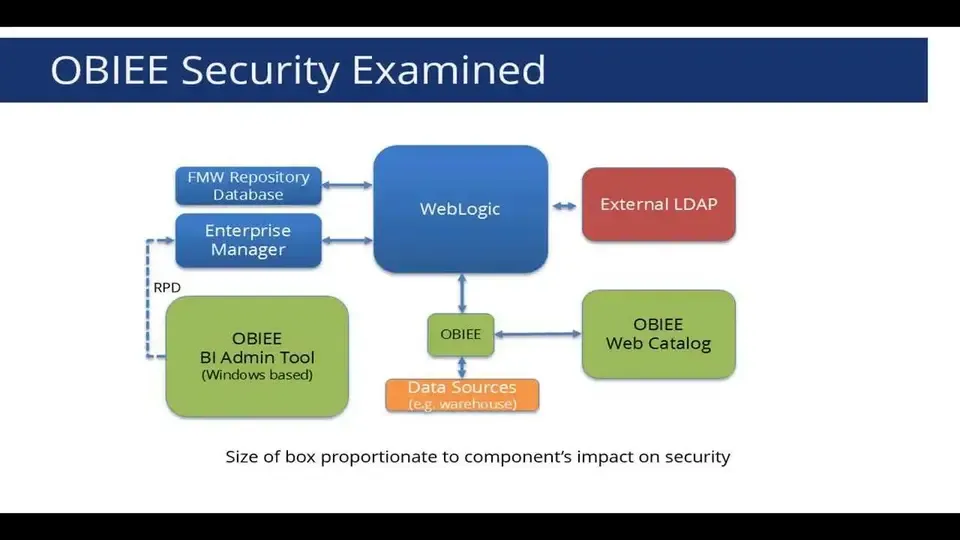
Oracle Business Intelligence Enterprise Edition (OBIEE) 11g gives users broad access to data, so its security is imperative to protect that data. We examine the security of every layer of the OBIEE technology stack, the OBIEE application, the WebLogic application server and the repository database, following a user from login to report, then pose the questions to ask about an installation and review the security of OBIEE's integration with Oracle E-Business Suite.
Based on our OBIEE Security Examined whitepaper, the webinar is the first in our OBIEE series. OBIEE administrators, DBAs and security teams can then make the key security decisions for their installation; the second webinar covers the top ten security risks for OBIEE.
Key Points
- OBIEE 11g, now desupported, defines users and groups in WebLogic and Enterprise Manager, not the RPD: WebLogic authenticates them through a default or custom security realm, Oracle Platform Security Services (OPSS) holds the identity, policy and credential stores, and policies map to application roles, such as BI Administrator, BI Author and BI Consumer, not groups.
- Authorization works at three levels: data-level filters that remove rows from result sets and object-level permissions on subject areas, tables and columns, both set in the RPD file, and presentation catalog ACLs, stored in
*.ATRfiles, that decide which reports and dashboards users, application roles and LDAP groups see; BI Publisher has a separate catalog. - Data-level filters use repository variables, the same for all users, and session variables that initialization blocks set when a user logs in, such as a filter on
RESPONSIBILITY_ID = 200so E-Business Suite users see only hourly employees; be careful of caching when session variables are combined with VPD andDBMS_SESSION.SET_IDENTIFIER. - The RPD, a single file built in the Windows-based BI Admin Tool, defines everything, including data source connection passwords and security filters, and is encrypted with its password; ask for RPD permission reports, which do not include BMM or physical filters and limits, and for catalog reports, which export to Excel for analysis.
- Redirect Usage Tracking, which reports RPD and Enterprise Manager configuration changes and who ran what report when, to log files with
STORAGE_DIRECTORYinNQSConfig.ini, and send them with the WebLogic, OBIEE and data source logs to centralized logging; OBIEE logging levels 0 to 7, set in the BI Admin Tool, apply to users, not roles. - E-Business Suite users reach OBIEE through EBS, not SSO: a menu function built on
OracleOasis.jspgenerates the URL from the profile option FND: Oracle Business Intelligence Suite EE base URL, and an initialization block callsAPP_SESSION.validate_icx_sessionwith the EBS session cookie to set variables such asresp_id,user_idanduser_name.