
eLearning webinar on the new security features, enhancements and changes in Oracle E-Business Suite 12.2, including the move to WebLogic Server and the new methods for securing the application server layer.
 Play the Recording: New Security Features in Oracle E-Business Suite 12.2
Oracle E-Business Suite 12.2 introduced a number of new security features, enhancements and changes, and moved the EBS application server from Oracle Application Server 10g to Oracle Fusion Middleware 11g with WebLogic Server, which changes how the application server layer is managed and secured.
We examine each new feature as it stood at the 12.2 release, its impact on an implementation and how to use it, from Flexfield Value Set Security and Allowed JSP Lists to clickjacking protection and attachment virus scanning, with a demonstration of WebLogic and Fusion Middleware Control. EBS DBAs and security teams can then plan what to set up when they upgrade.
Key Points
- At its release, 12.2 ran on Oracle Fusion Middleware 11g with WebLogic Server and an Oracle 11gR2 database, now desupported; online patching makes it much more complex, with two full installs of the application server stack and Edition-Based Redefinition in the database, and configuration is split among Fusion Middleware Control, the WLS Administration Console and AutoConfig.
- Flexfield Value Set Security, enabled by default, adds segregation of duties to maintaining value sets in the Segment Values form, with access explicitly granted by user, responsibility, role, application or operating unit; it needs mandatory Patch 17305947:R12.FND.C, and all value sets stay locked after install or upgrade until setup is done (MOS Note ID 1589204.1).
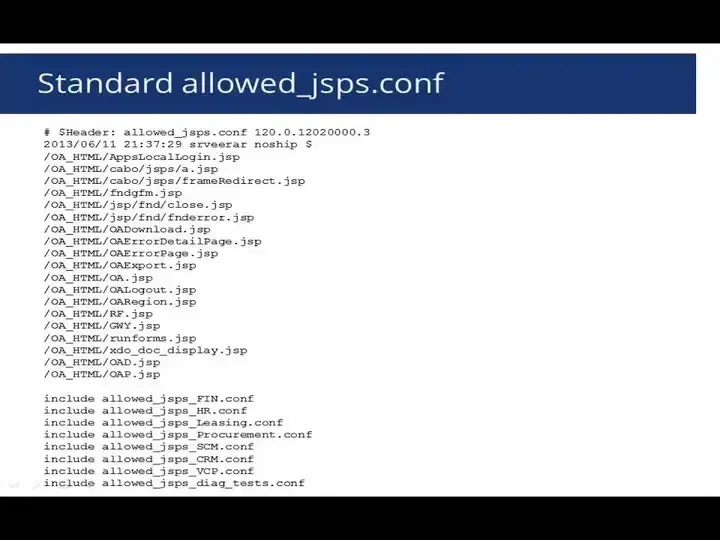
- Allowed JSP Lists, a whitelist of JSP pages that limits access to unused pages of modules not configured or licensed, was disabled by default: set the profile option Allow Unrestricted JSP Access (
FND_SEC_ALLOW_JSP_UNRESTRICTED_ACCESS) from Yes to No at site or server level; it has since become Allowed Resources, enabled by default from 12.2.6. - A fresh 12.2 install sets the passwords of the WebLogic control, APPS, APPLSYS, SYS, SYSTEM, CTXSYS, OUTLN, 9 other standard accounts and all EBS product schemas, leaving APPLSYSPUB/PUB the only default among 191 database accounts, but upgrades add accounts for new modules, such as XLE, ZX and XDO from 11.5.10, to check for default passwords.
- Against clickjacking, frame busting, on by default unless FND: Disable Frame Busting (
FND_DISABLE_FRAME_BUSTING) is set to True, keeps OA Framework pages out of third-party sites' frames, and the X-Frame-Options HTTP response header, configured in the Apachehttpd.conf, is enabled by default for all EBS pages; the profile optionICX_SESSION_COOKIE_DOMAIN(default: domain) protects the session cookie. - Attachment virus scanning (FND: Disable Virus Scan) suits iRecruitment and iSupplier, and XSS checks now cover uploads and attachments, but concerns remain: application passwords are still encrypted, not hashed, by default, Delivery Manager can e-mail, FTP or save report output, and DBA and security teams must know how to secure SOA and REST web services.